
Victorian Conveyancing Workflows and Precedents for Smokeball and triConvey
A ready-built VIC purchase and sale system your team, or your virtual assistant, can run from day 1
-
 2 complete workflows: VIC Purchase (19 steps) and VIC Sale (17 steps).
-
35 Victorian precedents built into the workflow steps.
-
Every step has instructions, a checklist and, where one applies, the right document ready to generate.
-
Built so a VA can be plugged in without rebuilding your process.
-
Installs straight into Smokeball or triConvey.
Built for 2 Kinds of Firms
Victorian firms ready to streamline
You already practise in Victoria, but files are run from memory, old checklists or precedents that sit outside your practice management system. The Workflow Conveyancing VIC pack replaces that with a process that runs the same way on every file, no matter who picks it up, and is structured so a virtual assistant can slot straight in.
Firms expanding into Victoria
You practise in NSW, QLD or WA and want to take on Victorian work. Instead of building a Victorian process from scratch, start with one that already covers the section 32 statement, the Digital Duties Form, notices of acquisition and Victorian settlement steps.
Already a Workflow Products client in another state? Victoria is 50% off the monthly subscription and the installation fee is waived.
How It Works in Your Matter
Step 1: Apply the workflow
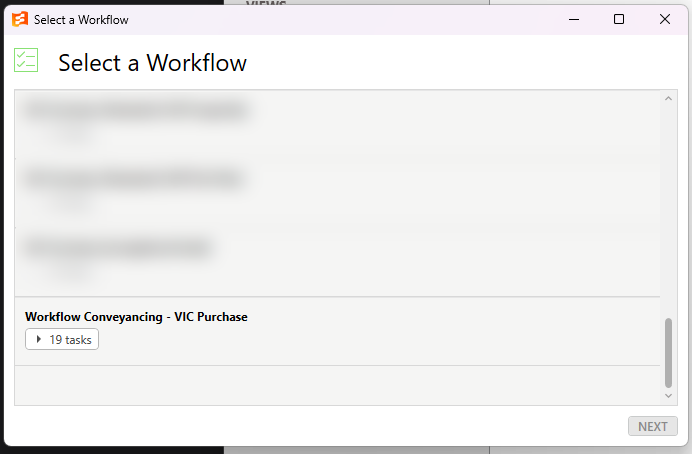
Open a new Victorian matter, click Apply Workflow and select Workflow Conveyancing VIC Purchase or VIC Sale. That is the only set-up on each file.
Step 2: Your task list builds itself
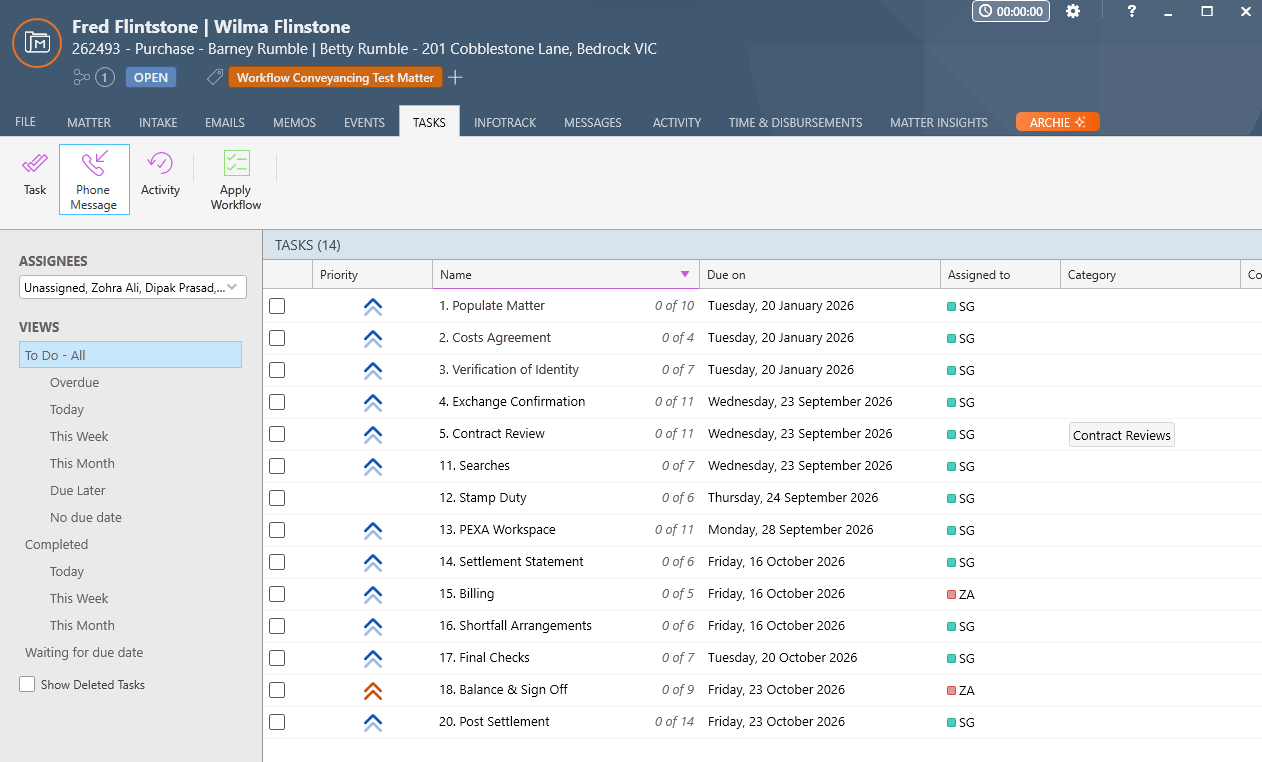
Every task is created in order, assigned to the right person and given a due date linked to the key dates in the matter, from populating the matter and the costs agreement through to exchange, contract review, finance and building and pest.
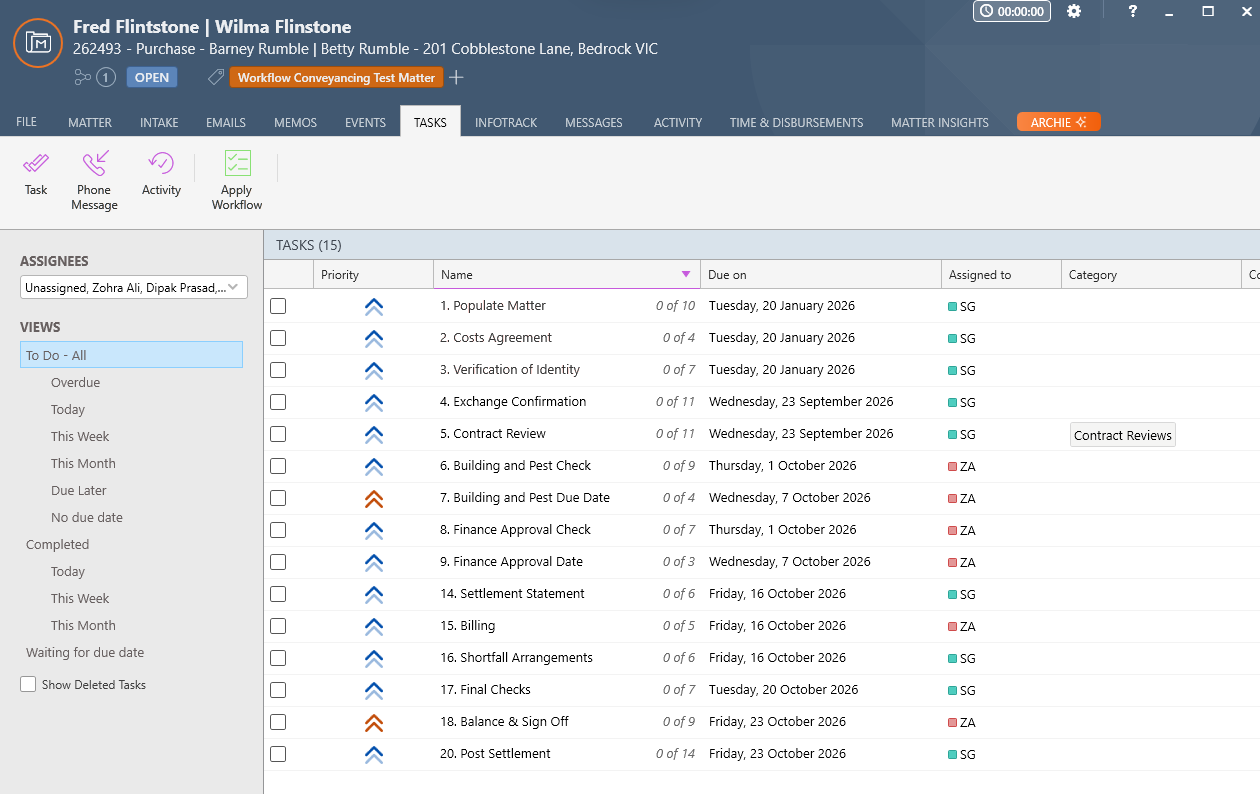
Step 3: The next stage appears when it is due
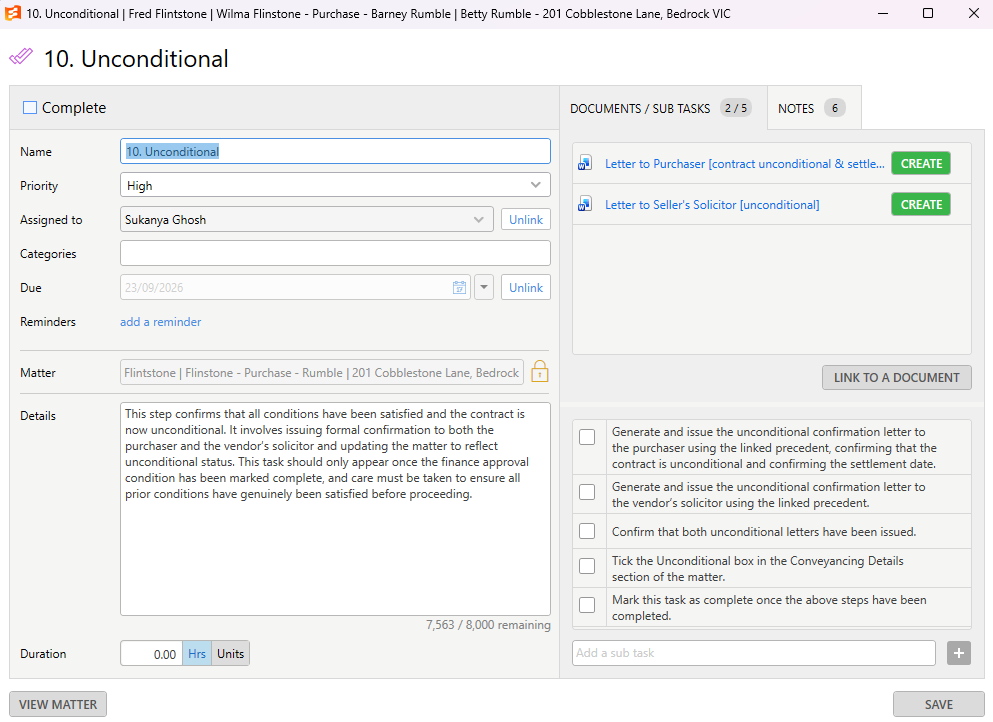
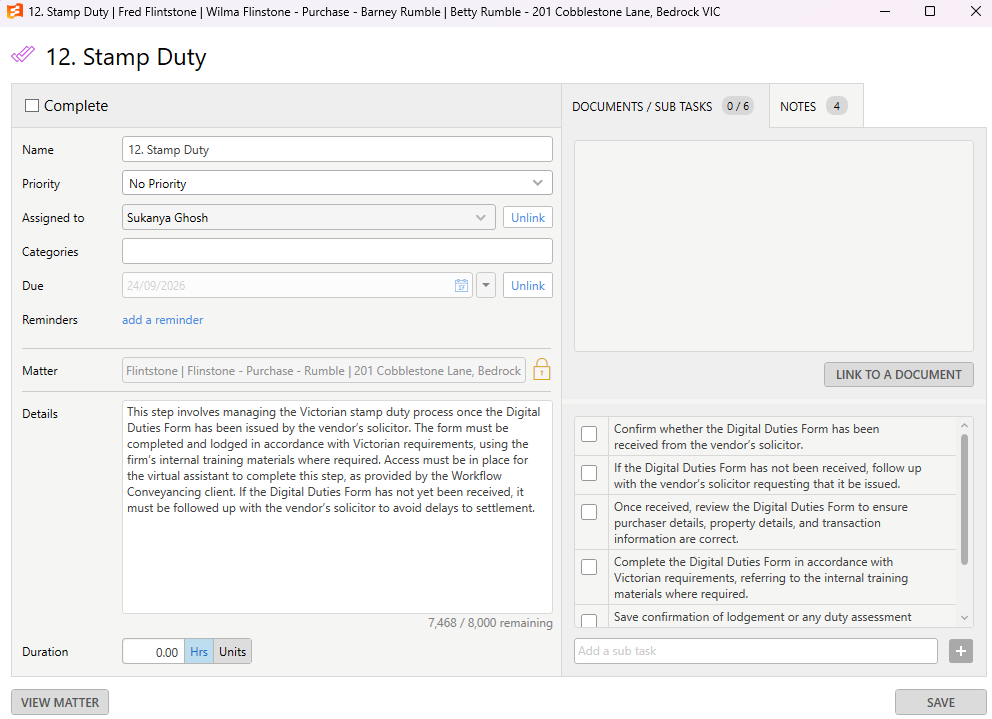
Tasks unlock as the file moves. Once finance approval and building and pest are marked off, the Unconditional step appears. Complete it and the settlement preparation tasks follow: searches, stamp duty and the PEXA workspace, alongside the settlement statement, shortfall, final checks and sign off. Your team only sees what needs doing now. The VIC Sale workflow works the same way.
Instructions, Checklist and Precedent in Every Step
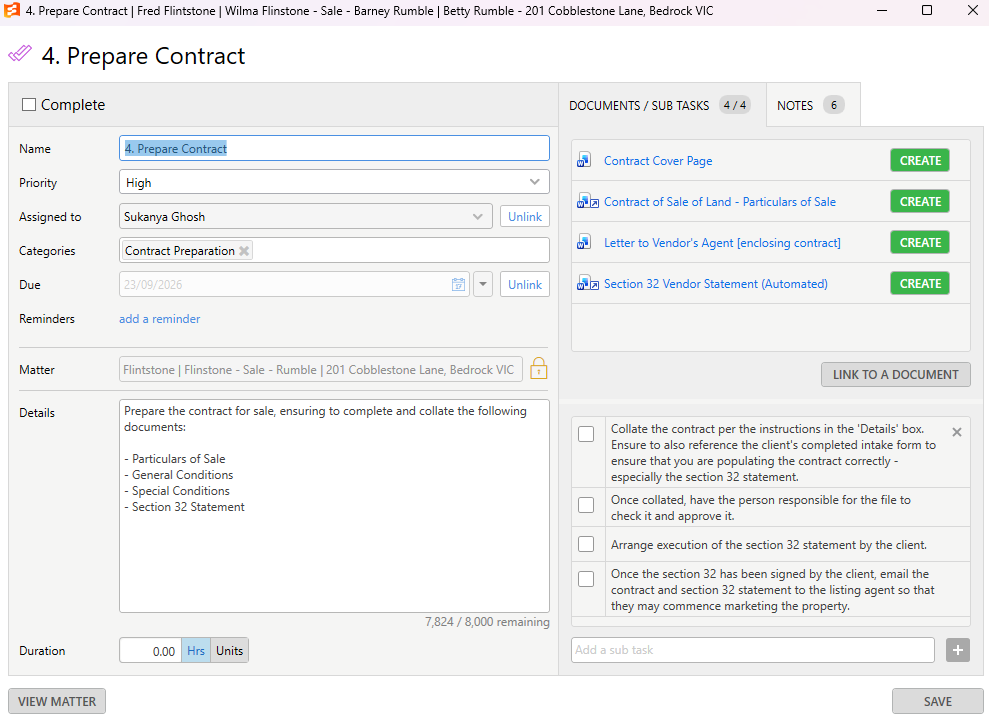
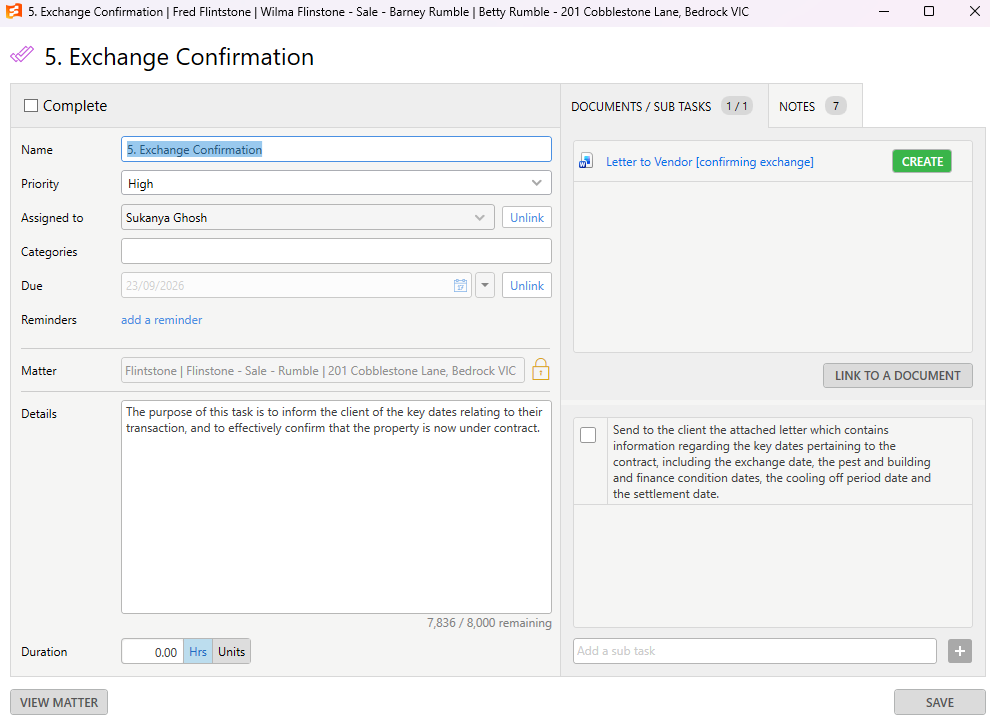
Details: a plain-English explanation of what the step is for and when it should be done.
Checklist: the sub-tasks in the order they should be completed, so nothing is missed.
Precedents: where the step needs a document, the Victorian letter or form is linked and ready to generate with one click.
This is what makes the pack VA ready. A new team member or virtual assistant can open any step and know exactly what to do, in what order, with the right document in front of them.
What Is in the VIC Pack
VIC Purchase
19-step workflow from matter opening to post settlement, with 17 Victorian precedents.
See the 17 purchase precedents
- Costs Agreement
- Letter to Buyer – Enclosing Costs Agreement
- Letter to Client – Contract Review
- Letter to Client – Confirming Exchange
- Letter to Vendor's Solicitor – Seeking Extension to Finance Approval
- Letter to Vendor's Solicitor – Seeking Extension to Pest and Build Date
- Letter to Purchaser – Contract Unconditional and Settlement Date
- Letter to Seller's Solicitor – Unconditional
- Letter to Client – Stamp Duty Paperwork
- Letter to Vendor's Solicitor – Statement of Adjustments
- Statement of Adjustments
- Letter to Client – Shortfall Estimate
- Order on Agent
- Letter to Council – Notice of Acquisition
- Letter to Water Authority – Notice of Acquisition
- Letter to Body Corporate – Notice of Acquisition
- Letter to Client – Post Settlement
VIC Sale
17-step workflow from contract preparation to post settlement, with 18 Victorian precedents, including discharge authority letters for CBA, NAB and HSBC.
See the 18 sale precedents
- Costs Agreement (VIC Sale)
- Letter to Client – Enclosing Costs Agreement
- Contract Cover Page
- Contract of Sale of Land – Particulars of Sale
- Section 32 Vendor Statement (Automated)
- Letter to Vendor's Agent – Enclosing Contract
- Letter to Vendor – Confirming Exchange
- Letter to Agent – Confirmation of Deposit Held in Trust
- Letter to Client – Confirming Contract Unconditional and Discharge Authority Request
- Letter to Client – Enclosing Discharge Authority
- Letter to Client – Enclosing CBA Discharge Authority Form Link
- Letter to Client – Enclosing NAB Discharge Authority Form Link
- Letter to Client – Discharge of Mortgage (HSBC)
- Letter to Client – Payout Figure and Surplus Funds Confirmation
- Letter to Client – Clearance Certificate Instructions
- Letter to Client – Balance Payable on Settlement
- Letter to Agent – Enclosing Order on the Agent
- Letter to Client – Post Settlement
Simple Pricing
Pricing is based on firm size, on a minimum 12-month term. All prices are plus GST.
Essentials
From $79 + GST per month. No setup fee.
The Victorian precedents library, with automated precedent updates.
Premium
From $149 + GST per month, plus a $350 + GST installation fee.
Workflow installation, the precedents library, automated updates, a product user manual, maintenance and the Workflow ticketing support system.
Adding Victoria to another state? Your first state is full price. Each additional state is 50% off the monthly subscription and the installation fee is waived.
Need the People as Well as the System?
Workflow Staffing
Experienced conveyancing virtual assistants who can work inside the same workflows, with support across NSW, VIC, QLD and WA. Part-time, full-time or task-based.
Workflow Settlements
Hand off your Victorian purchase settlements for a flat $395 + GST per settlement, including VOI and AML/CTF checks.
Questions About the VIC Pack
Which software does it work with?
The VIC pack runs inside Smokeball or triConvey, using their own task, workflow and precedent features. There is no separate software to learn.
What is the difference between Essentials and Premium?
Essentials gives you the Victorian precedents library with automated updates. Premium adds the full VIC Purchase and VIC Sale workflows installed in your system, plus a user manual, maintenance and ticketing support.
We already use Workflow Products in another state. What does Victoria cost?
Each additional state is 50% off the monthly subscription, and the installation fee is waived.
Can a virtual assistant run these files?
Yes. Every step carries its own instructions and checklist, with the precedent linked where one applies, so a VA can follow it without relying on your team to explain each file. If you need the VA too, see Workflow Staffing.
Is there a minimum term?
Yes, both Essentials and Premium are on a minimum 12-month term.
Prefer to see it live? Book a 30 minute demo and we will walk you through both workflows in a Smokeball matter.